CyberSol Open Sources Design Driven Development
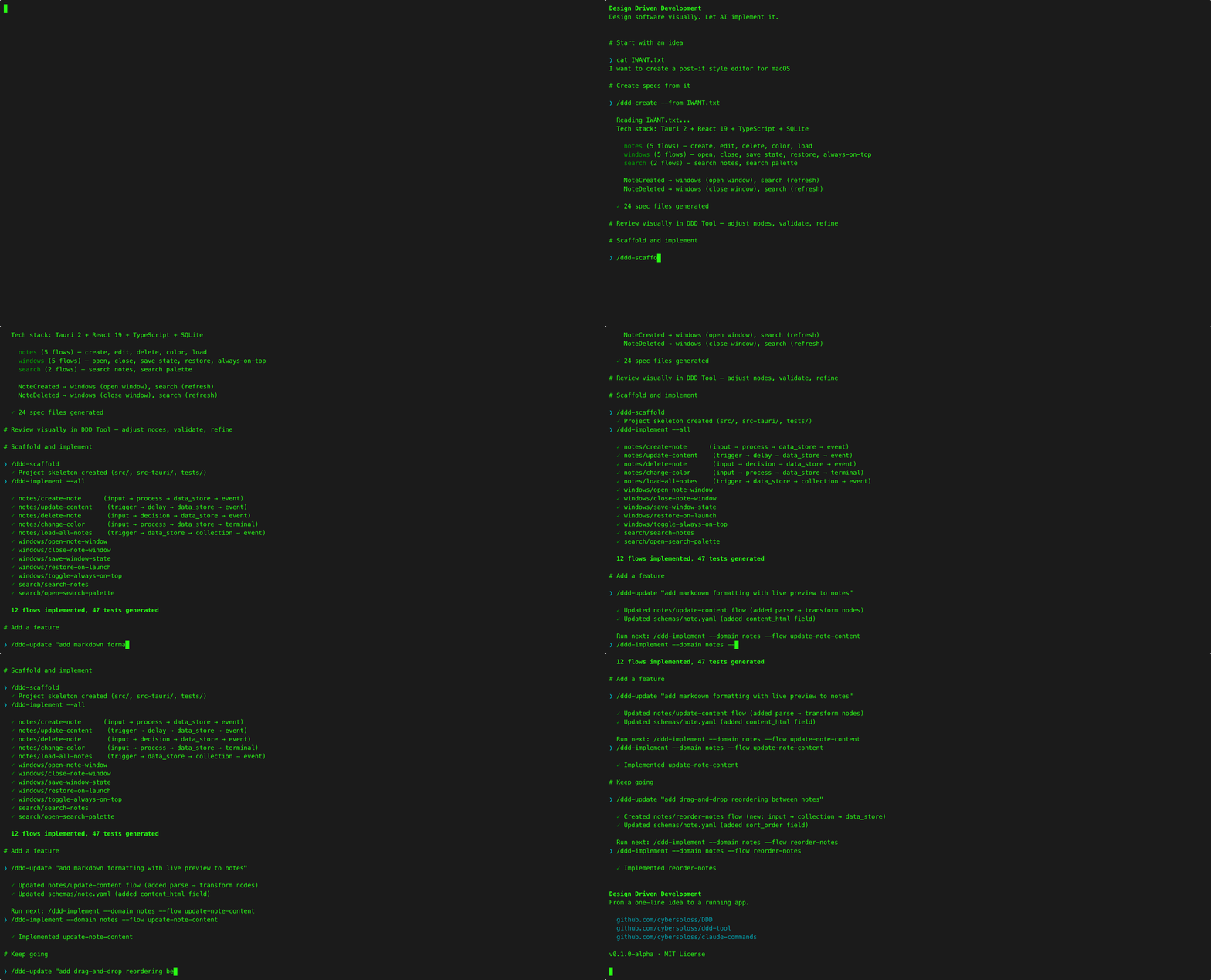
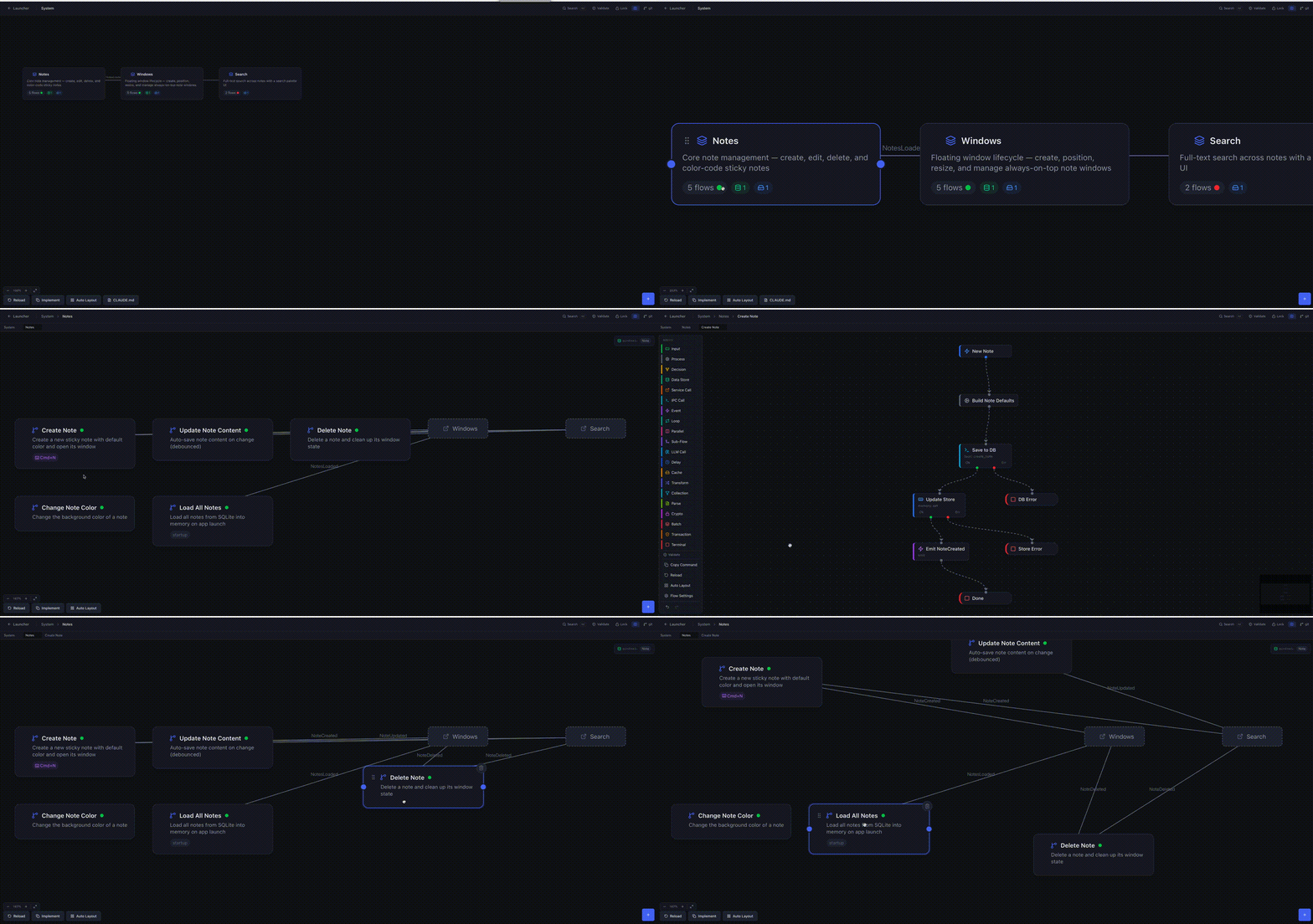 We've been building a methodology and toolset for designing software visually and letting AI implement it. Today we're making it all publicly available.
The Problem We're Trying to Solve
If you've used AI coding tools for anything beyond small scripts, you've probably noticed: the AI does good work in a session, but the next time you come back, all that context is gone. The patterns it found, the architectural choices it made, the edge cases it handled — none of it carries forward. You end up re-explaining your system, re-establishing conventions, and hoping it reaches the same conclusions.
Some tools address this with memory files or long context windows. Those help, but they're unstructured — a flat list of notes, not a navigable map of your architecture.
We wanted something more deliberate: a structured specification layer that both humans and AI can read, visualize, and evolve over time. Specs define what and why. Code accumulates how. A feedback loop connects them.
Most AI workflows lose design intent between sessions. DDD keeps it.
What We're Sharing
Three repositories, now public under MIT on CyberSol OSS:
Design Driven Development — The methodology. Four phases: Create → Design → Build → Reflect. Describe software, design it as visual flow graphs, generate code from YAML specs, and feed implementation wisdom back into the design. Includes a comprehensive Usage Guide covering all 28 node types, YAML formats, and a complete todo-app example you can try immediately.
Design Driven Development Tool — The desktop app. Built with Tauri 2.0 (Rust), React 19, TypeScript. Three-level canvas (System Map → Domain Map → Flow Canvas), 28 node types, bidirectional YAML sync, validation, Git integration, and drift detection between specs and code.
DDD Commands — 11 Claude Code slash commands for the full lifecycle: /ddd-create, /ddd-implement, /ddd-reflect, /ddd-promote, and more.
Try It Yourself
The fastest way to understand what this does:
-
Open the examples/todo-app in the DDD repo — a complete spec set for a simple todo app (2 domains, 4 flows). Read the YAML files. That's what DDD specs look like.
-
If you have Claude Code, install the commands and try it:
git clone https://github.com/cybersoloss/claude-commands.git
mkdir -p ~/.claude/commands
cp claude-commands/ddd-*.md claude-commands/DDD-commands.md ~/.claude/commands/
Then open the example project and run /ddd-implement --all to generate working code from the specs.
You Don't Have to Change How You Work
If you're already productive with prompt→code→prompt→code, DDD doesn't ask you to stop. Just swap your prompts for /ddd-update and /ddd-implement:
/ddd-update "add rate limiting to the API" → /ddd-implement → code
/ddd-update "add WebSocket support"        → /ddd-implement → code
/ddd-update "extract auth into middleware"  → /ddd-implement → code
Same loop, same speed. The difference: every change quietly accumulates in your specs. You never have to open the visual tool.
Until the day you do — when a new team member joins and needs to understand the architecture. When you come back to a project after a month and can't remember why anything is wired the way it is. When a senior developer asks "show me the system design" in a review.
That's when you open DDD Tool and everything is already there: every domain, every flow, every decision — visualized and navigable. Not because you documented it, but because you were building with it all along.
How It Works
Phase 1: CREATE          Phase 2: DESIGN         Phase 3: BUILD          Phase 4: REFLECT

Describe your software   Open the Design Tool    /ddd-scaffold           /ddd-sync
/ddd-create generates    validate on canvas      set up skeleton         check alignment
full YAML spec structure refine, adjust              |                       |
                                                     v                       v
                                                 /ddd-implement          /ddd-reflect
                                                 generate code + tests   capture wisdom
                                                     |                       |
                                                     v                       v
                                                 /ddd-test               /ddd-promote
                                                 verify tests pass       enrich specs
The Part That's Actually New
Code generation isn't novel. What DDD adds is the reverse direction.
When you run /ddd-reflect, it scans your implemented code and finds patterns your specs never described — error handling conventions, retry strategies, caching logic, API workarounds. /ddd-promote feeds those patterns back into the specs. Next time /ddd-implement runs on a different flow, it applies them automatically.
Concrete example: you implement a service call flow and add exponential backoff with jitter for API retries. /ddd-reflect detects that pattern. /ddd-promote enriches your specs with it. Now every future service call flow gets that retry strategy without you specifying it again.
Code generation → pattern extraction → spec enrichment → better future generation. The system gets smarter with each iteration.
Where This Stands
This is early-stage tooling (v0.1.0-alpha) that we've been using internally at CyberSol. It works for our workflow, but we think it could be much better with community input — more node types, better templates, support for different tech stacks, and real-world usage patterns we haven't encountered yet.
That's why we're open-sourcing it. Not because it's finished, but because the ideas are strong enough to build on together.
No pre-built binaries for the desktop tool yet (build from source). No polished installer. No tutorial videos. It's alpha.
All repos are MIT-licensed. Each has a CONTRIBUTING.md with specific guidance on what we're looking for — from methodology improvements and new templates to node type proposals and documentation fixes. Significant portions were developed with Claude (Anthropic).